If you run an agency or a consultancy, you know the Friday ritual. Someone opens every thread for every client, reconstructs the week, writes an update that sounds calm and competent, and hopes nothing from another client slipped into it. Multiply by eight clients and the afternoon is gone.
With one SweetHive context per client and an agent that reads only that context, the first draft takes a minute. The judgment stays with you. Here is the setup and the routine.
The setup: one client, one context
Create a context for each client inside your hive. Give it two groups:
- Team, for your people working on the account.
- Client, for the people on the client side. They can join as guests: free, and limited to what you share with their group.
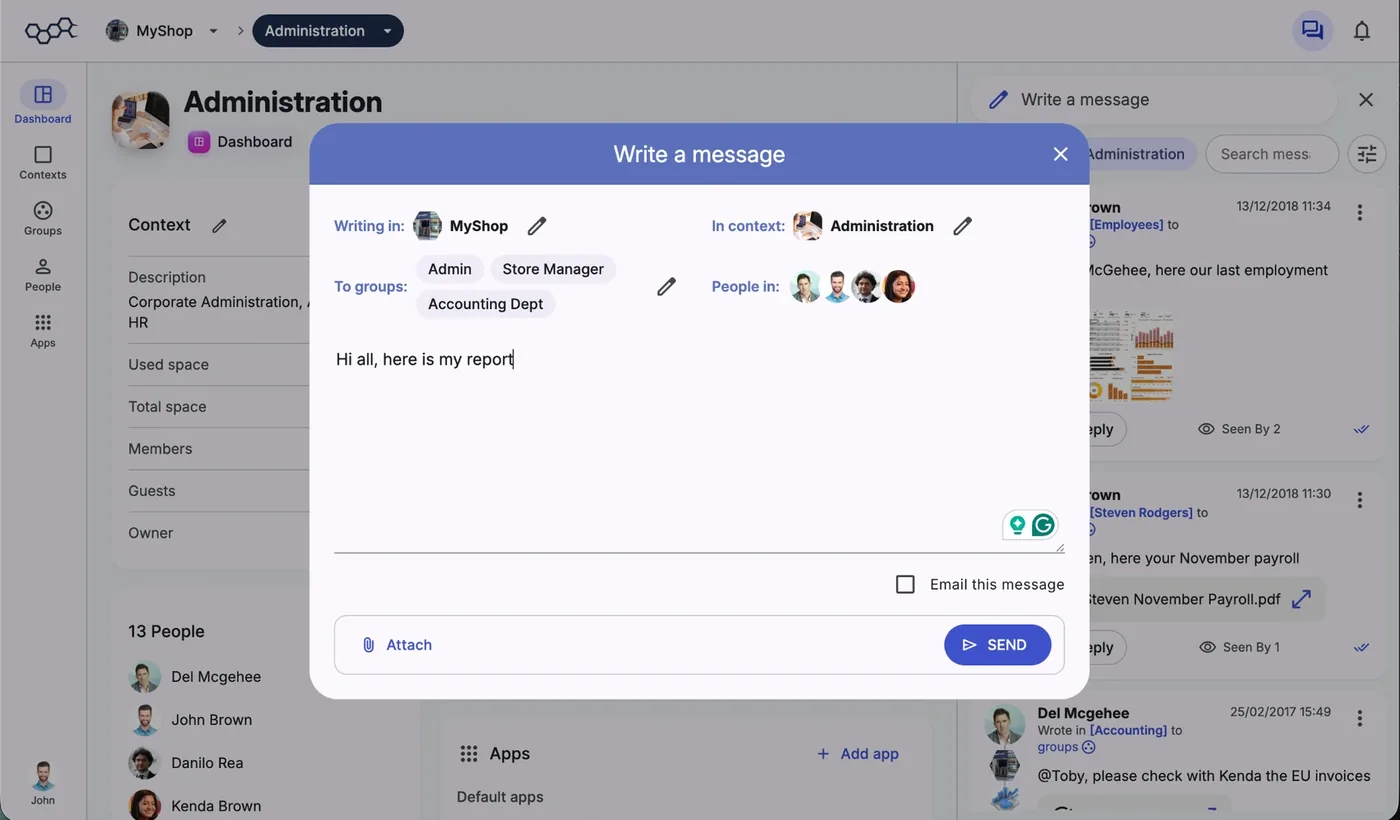
When you write in SweetHive, the composer asks where you are writing, in which context and to which groups, before you send. Internal discussion goes to Team. Anything meant for the client goes to Client. This is the habit that makes everything else safe, and it costs one click.
During the week: write small, write in context
The quality of Friday's update depends on what the team posts during the week. Ask everyone on the account to post short progress notes in the client's context, to the Team group:
- "Done: homepage copy approved by Marta."
- "Blocker: still waiting for the product photos."
- "Decision: launch moved to the 14th, agreed on the call."
- "Next: first draft of the newsletter on Tuesday."
Short notes with consistent labels are easy for the agent to find. Write the substance in the message. With Agents Node 0.2.23 or later the agent can read attached PDFs, images and text files, but not slide decks or other Office files, and search works on the message text. So "v3 of the deck attached, pricing slide changed" is still far more useful than the attachment alone.
On Friday: ask your agent for the draft
Create your personal agent in the client's context (on the context dashboard, Create my agent here). It covers that context and anything inside it, runs on your own computer with the SweetHive Agents Node or on your company's Agents Server, and sees only what you can see there. Then ask:
"Draft this week's update for the client from the messages since Monday. Sections: what we delivered, what we are working on, what we need from them, dates to remember. Friendly and concise, under 200 words. Leave out internal discussions about budget and staffing."
Then review. This step is not optional. Your agent can see everything you can see in that context, including internal Team messages, so you are the filter that decides what reaches the client. Check every date, remove anything that belongs inside the team, and add the sentence only you can write: the recommendation, the reassurance, the honest flag.
Why this is safe across clients
The fear with AI in an agency is cross-contamination: a summary for Client A that mentions Client B's campaign. Here, the structure prevents it. The agent created in Client A's context reads Client A's messages. It does not search your whole workspace and then filter; the other clients' contexts are simply outside its scope.
If you prefer one agent across several clients, you can create one with a wider scope, and SweetHive will still limit it to what you can see. For client updates, though, one agent per client context keeps every draft clean by construction.
Send it where the client already is
Post the final text in the client's context, addressed to the Client group. Your client contacts see it in SweetHive, with the history of every previous update in the same place. In the composer you can also tick Email this message, so the people who live in their inbox get it there too.
If you gave your agent permission to post, it can publish the update for you, but it always drafts first and asks for confirmation. Many teams prefer to copy the draft and send it themselves; both work.
Make it a template
After a few weeks, save the prompt that works best for each client and reuse it. A few refinements teams usually add:
- "Use the client's language" for international accounts.
- "Start with the one thing they need to decide this week."
- "List open questions from their side that we have not answered."
- "Compare with last week's update and say what moved."
When the week went badly
The routine matters most when there is bad news. A missed deadline or a blocked delivery is exactly what a rushed Friday update tends to soften or forget. Ask the agent directly:
"List everything that slipped this week compared with the dates we gave the client, with the message where each date was agreed."
You get the facts in one place, with sources, and you can write the honest version: what happened, what you are doing about it, and the new date. Clients forgive delays far more easily than surprises, and a team that reports problems early is a team they keep.
What it saves, honestly
The agent does not make your updates better than you would. It makes them faster and more complete, because it does not forget the small decision from Tuesday's call. The time you save goes into the part clients actually value: your judgment about what happens next.
For a studio of five people with eight clients, going from forty minutes to ten per update is most of a working day back every week. That is what few, but mighty looks like in practice.
Try it on one client this week. Start the 14-day free trial of SweetHive, create a context for your busiest account, invite the client as guests and let your agent write Friday's first draft.