"Where are we on this?" is the most expensive question in a small company. Someone has to stop, scroll through a week of messages, remember who said what, and write a summary that is out of date by the afternoon. If your project lives in a SweetHive context, you can ask your agent instead, and get an answer drawn from what the team actually wrote.
This guide shows how to set it up, which questions work well, and the writing habits that make the answers better.
One project, one context
In SweetHive, work is organized into contexts inside your hive. A project is simply a context: it has its own people, groups, messages, files and apps. When the team discusses the project there, every message lands in one place, addressed to the groups that should see it.
That structure is what makes the agent useful. A context agent does not search your whole company. It reads the messages of the contexts you pointed it at, and nothing beyond what you yourself are allowed to see.
Create your agent in the project context
- Open the project context. On its dashboard you will find the card Your personal agent.
- Choose Create my agent here. The agent covers this context and the contexts inside it.
- Pick where it runs: your own computer with the free SweetHive Agents Node, or your company's Agents Server if your organization has one. On the Node you choose a local model from a catalog tuned to your hardware.
- Open the chat from the context dashboard, from My agents, or from the Chat tab of the Agents Node. It is the same conversation everywhere.
Questions that work
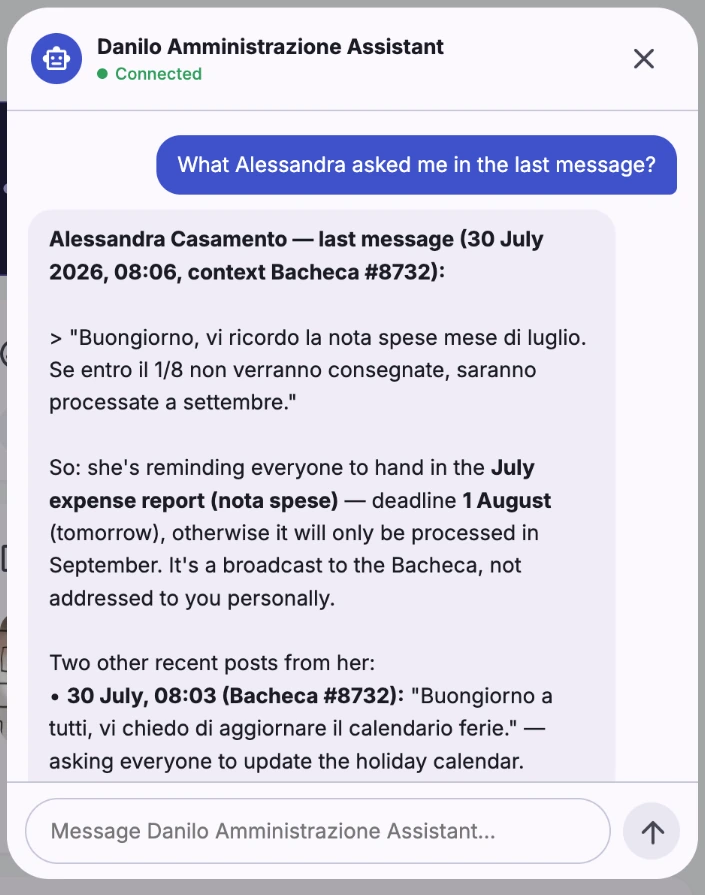
The agent can list recent activity in the context and search messages by keyword. The best questions combine a time window with a clear goal. Some prompts to start from:
- "Summarize what happened in this context since Monday. Group it by topic and name who said what."
- "List every message that mentions a blocker in the last two weeks. For each one, tell me if anyone replied with a solution."
- "What did we decide about the launch date? Quote the message and give me its date."
- "Which questions from the client are still unanswered?"
- "Draft a five-line status update for the team: done, in progress, blocked, next."
Ask the agent to quote and date its sources. You get an answer you can check in seconds, and you build the habit of trusting it only as far as the evidence goes.
Why scoping matters
A status question sounds harmless, but think about who asks it. Your project lead should get the full picture. A designer who works only on one sub-project should get their part. An external supplier invited to the project should never hear about your margins or another client.
In SweetHive the agent's reach is the intersection of two things: the contexts it was created for, and its owner's visibility. Visibility comes from the groups activated on each context, and SweetHive checks it on every request. If someone is removed from a group, their agent loses that access at the same moment. Nobody has to remember to update a separate AI permission list, because there isn't one.
This is also why one context per project pays off. When projects share a single noisy channel, any assistant either sees too much or nothing useful. When each project has its own context, the boundary is already drawn.
Writing habits that make answers better
An agent can only report what the team wrote. A few small habits make a big difference:
- Write the conclusion in the message. With Agents Node 0.2.23 or later the agent can open files attached to messages in its scope, such as a PDF or a scanned page, but search works on the message text. If a PDF holds the new plan, add one line saying what changed, so the agent and your colleagues find it first.
- Use the same words for the same things. Search works on keywords. Agree on a few labels, such as "Decision:", "Blocker:" and "Done:", and start messages with them when they apply.
- Keep updates short and separate. One topic per message is easier to find and to quote than a long weekly wall of text.
- Use sub-contexts for big workstreams. A context for each phase or team keeps questions focused, and the agent created on the parent still covers them.
- Address messages to the right groups. The composer asks where you are writing, in which context and to which groups before you send. That choice decides who, and which agents, will ever see it.
What the agent will not do
It is worth being clear about the limits. The agent will not read inside your apps, it will not see contexts or attachments outside its scope, and it will not post anything on your behalf without asking. It reads attached PDFs, images and text files, not Office documents, audio or video, nor files linked from Drive or Dropbox. If you give it permission to post, it drafts first and waits for your confirmation. A local model on a small laptop will also give simpler answers than a larger model on a workstation, so match the model to the questions you ask.
None of this replaces a good project lead. It removes the archaeology. Instead of spending twenty minutes reconstructing the week, you spend two minutes checking a summary and the rest deciding what to do next.
A five-minute weekly routine
- Monday morning, ask: "What changed since Friday, and what is blocked?"
- Check the quoted messages that matter.
- Ask for a five-line update and post it to the team group yourself.
- Reply in the threads that need a decision.
For a small team, that routine is often the difference between a project that drifts and one that ships.
See it on your own projects. Start the 14-day free trial of SweetHive, create a context for your current project and ask your agent where it stands.